Robot Edits Blog ~ Marking Up a Draft with an Agent in the Loop
What happens when tokenmaxxing gets to the point where you aren’t even willing to open a text editor to write your blog anymore? Well, I built a human-LLM loop for such a workflow. This post is part of my series where I have been building a machine that operationalizes this blog to work for me. Part 1 got the posts out of WordPress. Part 2 got the build onto Cloudflare Pages. Part 3 pulled the theme out into packages. Now we are here at Part 4, editing the blog.
The blog has a pile of drafts (as you can tell by the name, I am good at getting halfway done). Some are half-written posts about robots I saw in the wild, some are photo build logs, some are stubs with an editor’s note where the post should be. Claude drafts most of them from my notes and photos (I provide an outline or in some cases stream of consciousness notes that Claude somehow has to make sense of). Then I read them on the dev server and tell it what’s wrong. That last step was just pure tool switching friction. I would read a paragraph on the page, copy it, paste it into the terminal, type a line of direction, watch the agent edit, Astro refresh the page, and then go find my place again. By the fifth paragraph the terminal had scrolled the second one out of view and I could no longer tell which of my comments had been done. For large manual writes, drafting in MDX is fine, but I have a different lens when reviewing with all of the styling in place.
So on a Sunday evening (after an 8 hour car ride back from San Diego visiting family), I hopped on my computer to relax. Claude and I had finished a smaller edit, then I typed this into the terminal.
I keep thinking about editing tools that would be handy on the dev live server in drafts mode. Pinned comments, highlighters, erasers. Undo/redo button all in some tray? Maybe a pen tool?
That was the whole brief and then by the end of the night the tools existed.
Same disclaimer as before. Claude wrote the code and most of the tests. I made the calls and I am the one using it. The recipe is at the end, written so you can hand it to your own agent.
The editor’s note was half of it
When Claude drafts a post from my photos it never has all the facts. It does not know what year the roller was replaced or how many floors the house has. Early on I told it to never invent facts and to leave a marked question in the draft instead. That became a small component called an editor’s note, a dashed amber box that only renders in drafts. I read the draft, I see the box, I answer it, the box comes out.
The agent had a side-channel within the post and I did not; just living with the friction of copy-and-paste. My comments existed in chat and got lost as soon as the session scrolled. What I wanted was the mirror image of the editor’s note, a way to pin a comment on a phrase in the rendered draft and have the agent see it there.
Hence I rebuilt a ticket tracking system, with a place, some words, a status, and a close.
What the tools are
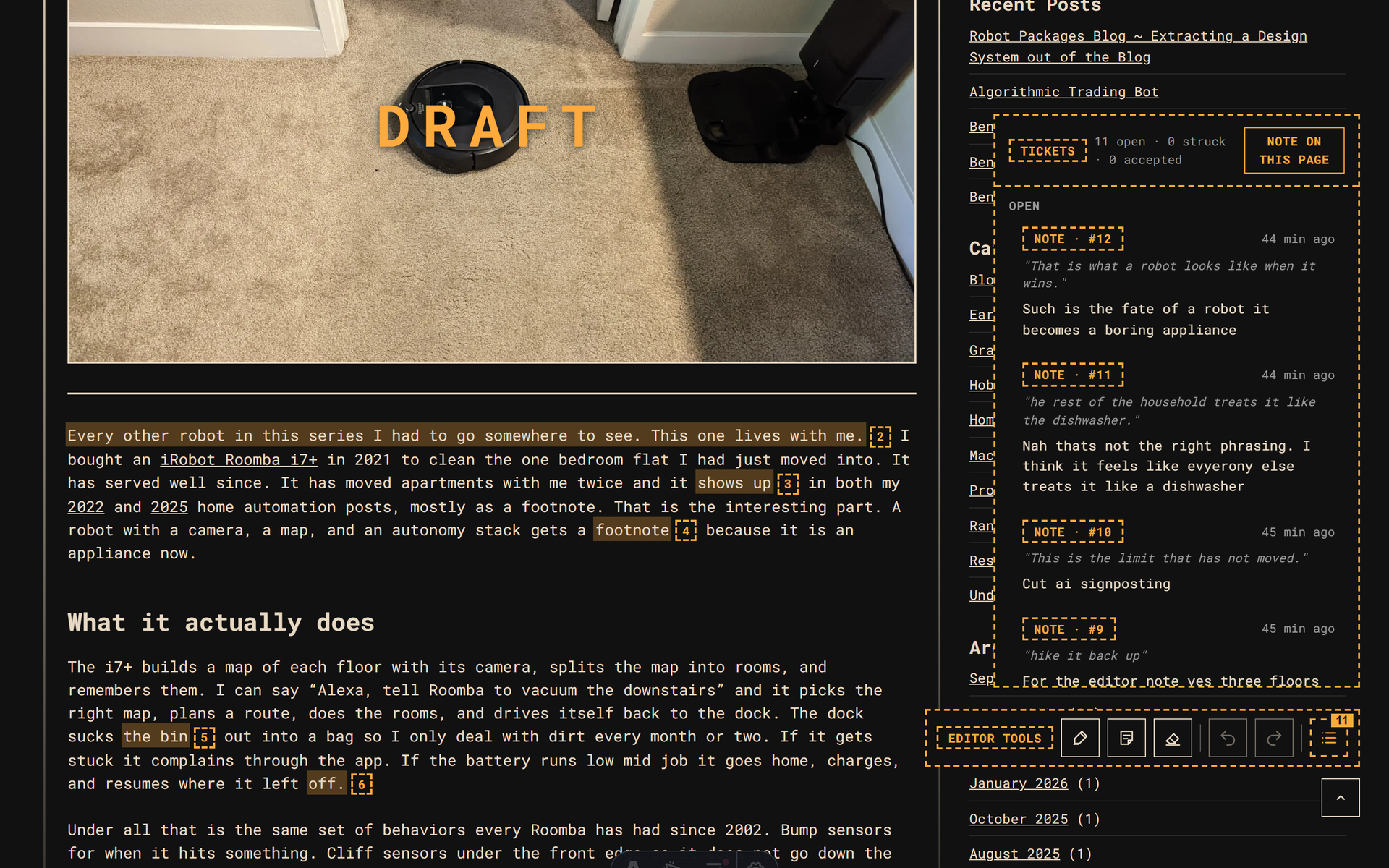
Five tools were developed: highlight, note, erase, undo/redo, and ledger, all within a tool tray at the bottom right of every page while the dev server is running. Each is discussed below.
Highlight is a marker. Select some prose and press one of the three, or press its key and drag across the text, and the phrase gets a translucent mark with a small numbered pin after it. Discuss (H) is “look at this,” for when I know something is off and cannot say what yet. AI slop (S) asks for a rewrite in my voice. Fact check (F) asks for the claim to be checked. A highlight can run across paragraphs.
Note is the post-it sticky we used to place on physical whiteboards (good old days). Same highlight gesture, but a small box opens under the selection with a textarea, and what I type becomes the ticket’s words. A note can be placed on an image, on a gallery, on the hero, or on one of the agent’s editor’s notes as a reply. There is a “note on this page” button for my less structured thoughts or comments that may need some kind of UI development.
Eraser removes a ticket. Undo and redo are there as the standard pair alongside it.
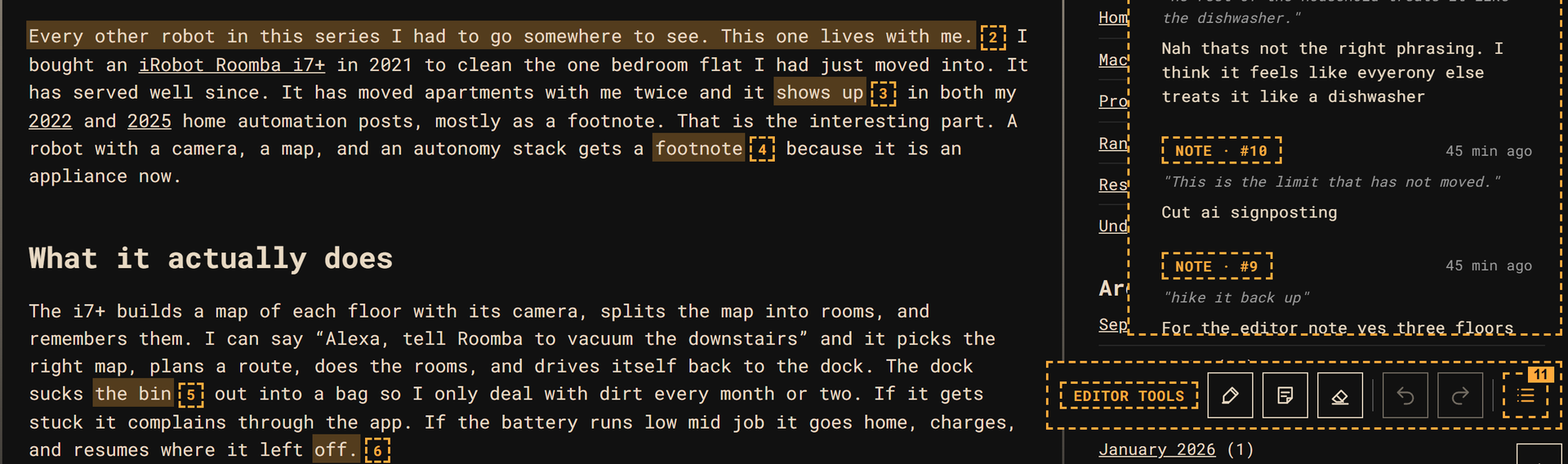
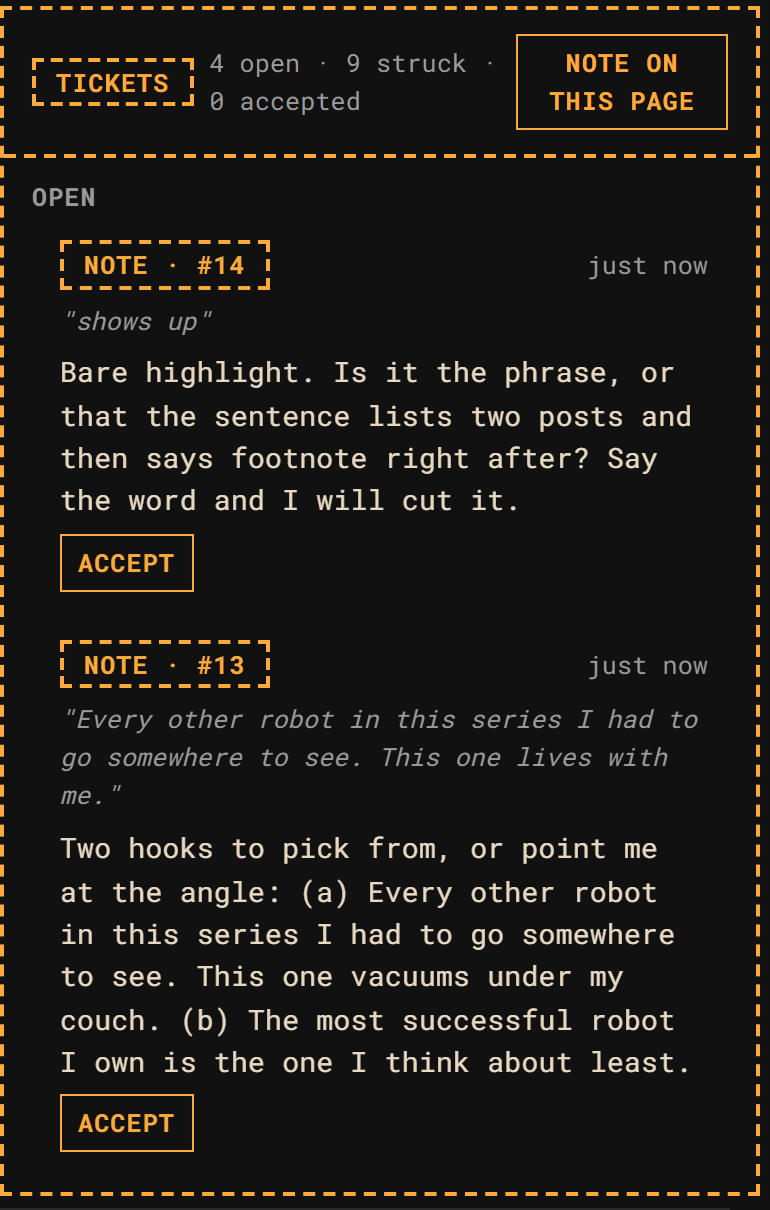
The fifth tool is the ledger itself. It is a sidebar that lists every ticket on the page, grouped by state, with the quoted phrase, the words, and how long ago. Click a row and the page scrolls to its mark. Click a mark and the ledger scrolls to its row. The page’s editor’s notes are listed there too, each with a Reply button, and the note itself carries the same Reply on the page.
All of it uses the editor’s note’s style, dashed amber stroke, boxed uppercase labels, and the site’s monospace type, so the tools read as one family with the note and not as part of the blog. Anything with a dashed amber line is an editing tool.
The loop
Picture first, then the parts.
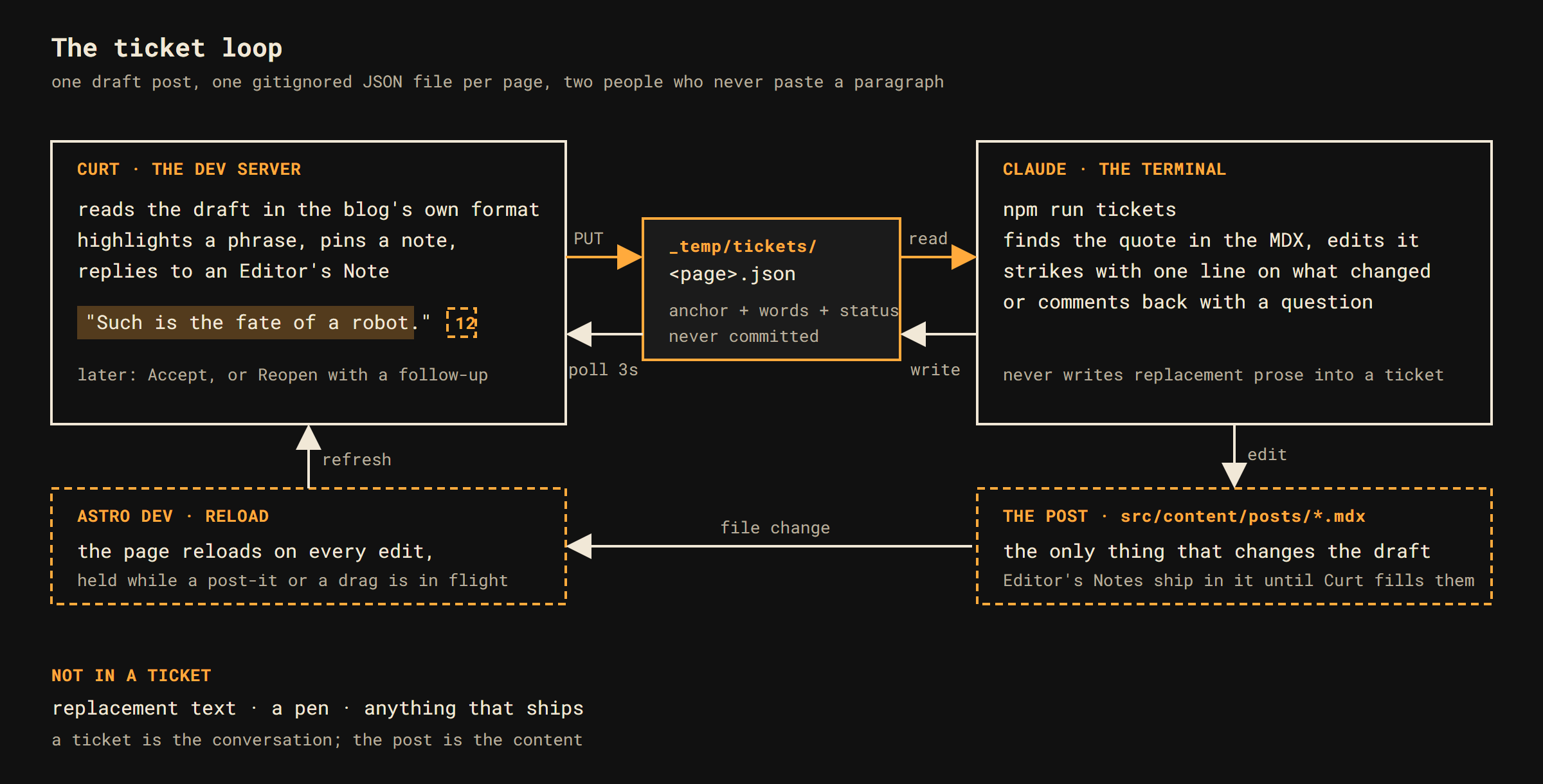
I read the draft on the dev server and leave tickets. Each page gets its own JSON file of them. The folder is gitignored, since tickets are chatter about the draft and not the draft.
On the other side, Claude runs one command that prints every open ticket on every page. It reads the file for the page, finds each quoted phrase in the MDX, and makes the edit the same way it always has. Then it strikes the ticket with one line on what changed, like “Cut the sentence; the paragraph opens on Everything else.” That line is what I read to decide whether I agree. Claude’s half of this is written down as a skill in the repo, so any session can pick up the queue (the recipe at the end has the details).
My open page polls that file every few seconds, so a struck ticket shows up in the ledger without a refresh, Claude’s line and two buttons (accept and reopen) under it. Accept archives it. Reopen sends it back with a follow-up. If Claude has a question instead of an edit, it leaves a ticket of its own, which then becomes my problem.
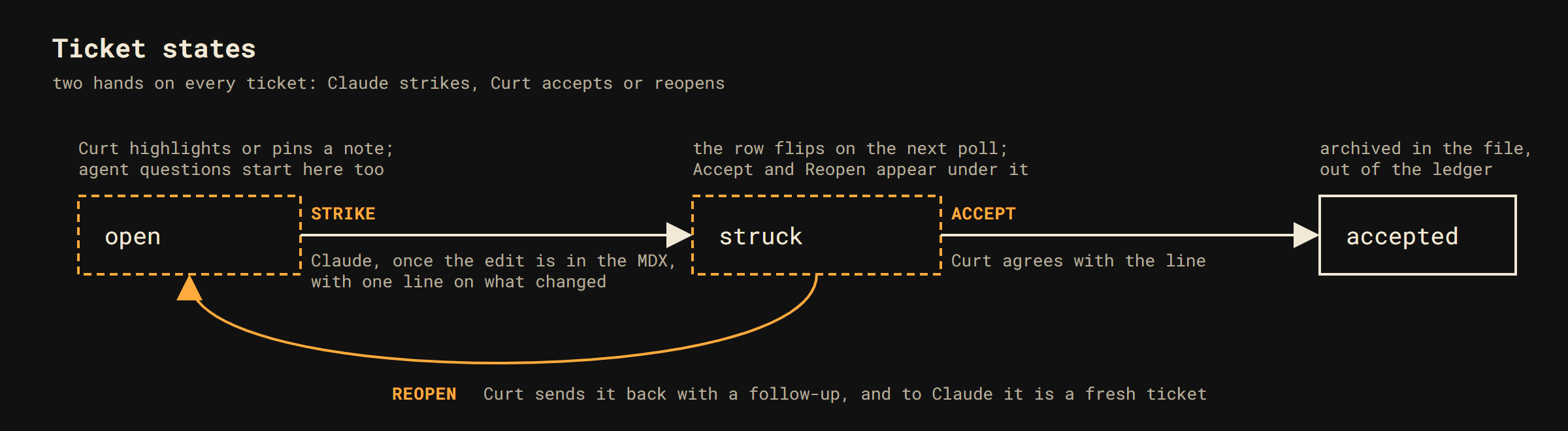
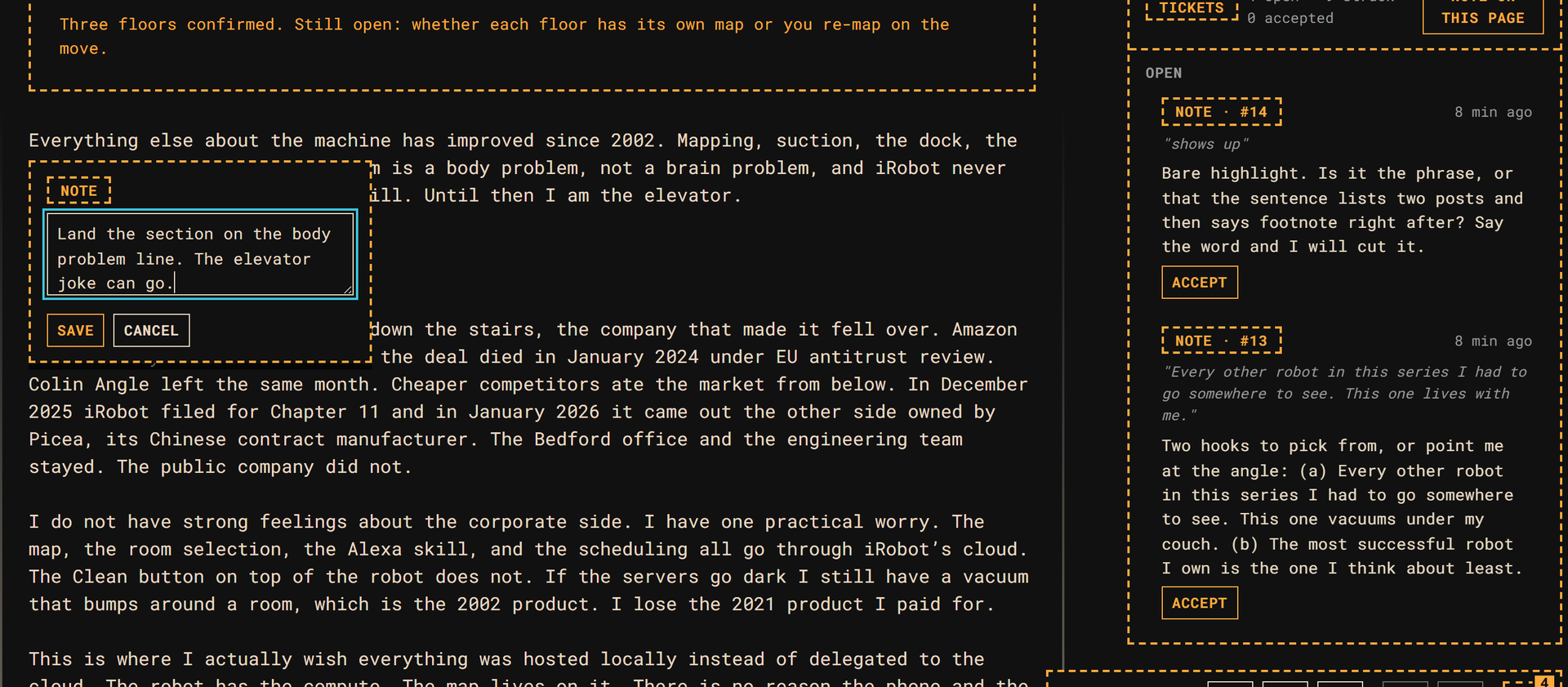
I did not want to recreate the Gutenberg editor (for those familiar with WordPress), and I did not want a comment that could rewrite my sentence when I clicked a button. So my first decision was that a ticket never edits a post by itself. It carries a place and some words, never replacement text, and Claude edits the MDX exactly as before. The second decision is that the editor’s note remains the agent’s channel and sits within the markdown, while a ticket is the conversation around the draft. When Claude writes a fact into the post the note can be removed. When it acts on a ticket the ticket gets struck. Critically, none of the tickets are needed to understand the post.
Where a ticket points
The only real engineering problem was the anchor. A ticket points at a phrase that is about to be edited, sometimes because of that very ticket, so a character offset is useless the moment a word changes above it.
The tray borrows what the web annotation folks worked out years ago. A text ticket stores the quoted phrase, 32 characters of context on either side, the nearest heading, and the paragraph index. A highlight that runs across paragraphs stores both ends the same way. To find it again the page looks for context plus quote in that paragraph, then the quote alone there, then the quote anywhere. The paragraph index is a hint, not a key, so a paragraph inserted above does not break it. An image ticket stores the alt text and the filename without its build hash, since the hash changes every build and the alt shouldn’t.
When nothing matches, the ledger flags the ticket “anchor lost” and drops its pin at the end of the last paragraph it knew. That happened four times in the screenshots below, each time because a ticket said the sentence was wrong and the fix replaced it, so the quote stopped existing.
A case study, the Roomba draft
One of the drafts that has been sitting around (it goes back to when this blog was hosted on Blogger) is a post about my Roomba. I am writing it now as part of the Robots in the Wild series, and Claude drafted it from my photos and two older posts. I read it that night with the tray and left eleven tickets. Most were small. “Sucks the debris from the robot’s bin out into a bag.” “Had to replace the rollers too after it decided to try and eat a chunk of wood.” “Imagine a Roomba with legs.” One was an answer to an editor’s note about how many floors the house has. Two were tone. “Cut ai signposting” on a sentence that announced its own point, and “nah thats not the right phrasing” on the dishwasher line, followed by the phrasing I wanted. One was a bare highlight on two words. One said “rework the hook.”
Then Claude ran the command.
$ npm run tickets
…roomba-2022 | #2 note | "Every other robot in this series I had to go somewhere to see. This one lives with me." | Rework the hook
…roomba-2022 | #3 highlight | "shows up" | (no text)
…roomba-2022 | #4 note | "footnote" | Not the right word. But relegated to appliance is the right beat
…roomba-2022 | #5 note | "the bin" | sucks the debris from the robots bin out into a bag
…roomba-2022 | #10 note | "This is the limit that has not moved." | Cut ai signposting
…roomba-2022 | #12 note | "That is what a robot looks like when it wins." | Such is the fate of a robot it becomes a boring appliance
It worked nine of them, struck each with a line, and left the other two open with a reply. On the hook it offered two candidates and asked me to pick or point. On the bare highlight it asked whether the problem was the phrase or the sentence around it. I want hands-on control for the hook and key phrases but filling in the grammar between my thoughts is perfect for an AI to spin.
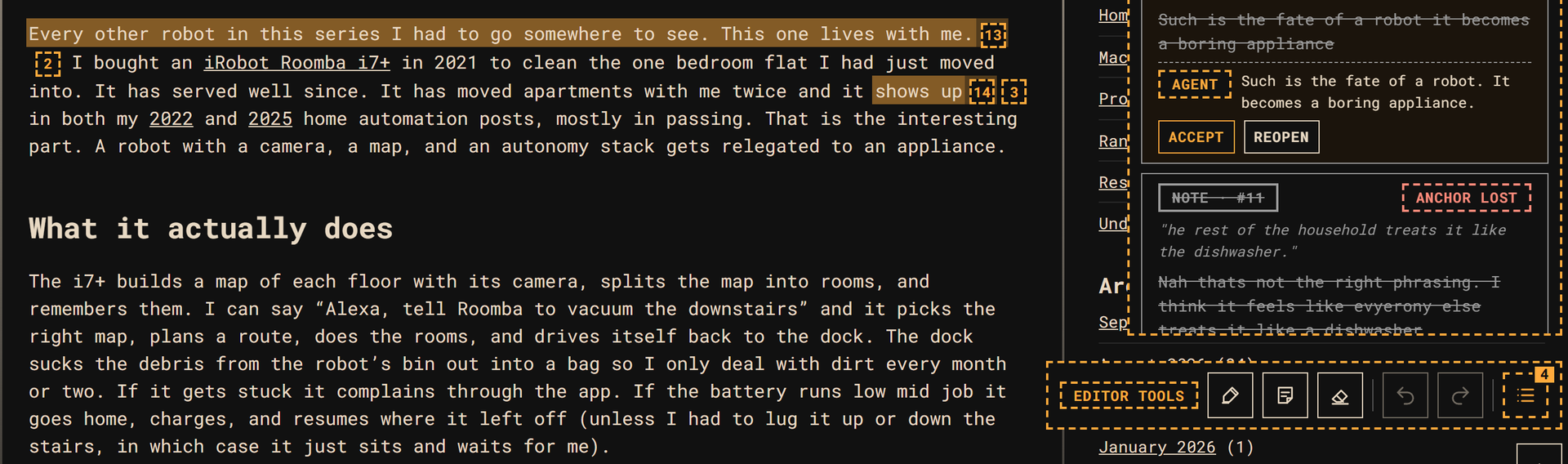
The “after” paragraph reads better than the “before” one and I did not type any of it into a terminal (probably still another cycle of editing needed but such is the art of writing).
And it’s broken
Three things broke that night.
- The safety gate. The tray must never ship (casual readers would be so confused if they were dropped into an editor), so a test builds the site and fails on any trace of the tray in the output. It failed on its first run. The build-mode check used Vite’s dev flag, which is also true in the test suite’s build, so the tray leaked. The check now compares the mode string, the same way the editor’s note does, and the test refuses the old flag.
- The reload. The dev server reloads the page whenever a file changes, and Claude changes files, so twice I lost a half-typed note. Vite already had a hook for this, so the tray holds the reload while a post-it is open or a drag is in flight.
- The command-line tool. The first version wrote the page’s URL into a new ticket file where the tray expected the page key. The tray then built a broken save path from it.
What this enables
I review drafts faster, because the review happens in the blog’s format instead of a terminal full of MDX and components where I have to imagine the visual medium, and I catch different things, like a caption that runs too long or a callout in the wrong place, that I don’t see in the source.
When I come back to a draft a week later I can read what I asked for and what the agent did. Every ticket keeps its own history.
The recipe, written for your robot
Here is the process, written for your agent rather than for you.
Step zero. Decide what a ticket is
- Ask what the owner already has. If there is an in-page channel for the agent (a fill-in note, a TODO block that renders in drafts), the owner’s tool is its mirror, in the same visual register.
- Ask where tickets live. Local and ignored by git is the answer unless the owner says otherwise. Tickets are conversation, not content.
- Ask what a ticket may do to the post. The safe answer is nothing. A ticket carries a place and words. The agent edits the source as it always has and the ticket only records that it happened.
- Ask what closes one. Two stages is enough. The agent strikes with one line on what changed, the owner accepts or reopens with a follow-up.
- Ask what can be anchored. Text selections and images cover a blog. Arbitrary elements can wait.
Show it before you spec it
- Draw the tray, the post-it, and the ledger on a page that looks like the owner’s site, in the owner’s design register. One desktop artboard, one phone, one anatomy sheet of the states.
- Get the owner’s yes on the picture. Then write the spec from the picture, with every decision above recorded as the owner’s and dated.
The build, in order
- Anchors first, as a pure module with tests. Quote, context on each side, the nearest heading, the paragraph index. Find by context and quote, then quote in the paragraph, then quote anywhere. Images by alt text, then by filename without the build hash.
- The store. The file is the whole state. Every owner operation rewrites it, history is append-only, undo and redo are snapshots that clear when the file arrives from outside.
- The transport. One dev-server middleware that serves and accepts one file per page key, validates the shape on the way in, writes atomically, and answers a bad file with a refusal rather than an overwrite.
- Marks and pins on the page, with the pin right after the last mark.
- The tray, the post-it, the keys. Tools arm and wait; nothing happens on a selection until a tool is armed, and an armed tool applies on mouse release.
- The ledger, with the same ticket list the page draws, and the owner’s accept and reopen on each struck row.
- The safety gate. Middleware only in the dev-server hook, the island behind a mode check that is a string comparison and not a build flag, and a test that builds the site and greps the output for any trace. Run this test before the next step, not after.
- A command for the agent that lists open tickets, strikes one with a line, and comments back. Never let the agent hand-edit the file.
- Hold the reload. Register a listener on the dev client’s before-reload event that returns a promise while a post-it is open or a drag is in flight, with a cap and a stash.
- Write the agent’s half of the loop down as a skill in the repo, so the next session runs it without the history.
The gotchas
- The dev client’s before-reload listeners are awaited. That is the hook. Do not patch the server.
- If the test runner sets the environment to test, the dev server it spawns has hot reloading off. Tell that server it is in development.
- Two dev servers in one clone race on the content cache when a content file changes. Trigger reloads in tests by touching a layout file’s timestamp, never by writing content.
- A build-mode flag that is true in a test build will leak the tools into the test build. Compare the mode string.
So who did what?
Claude did the spec, the mockup, the plan, and the eight tasks in it, each one built by a fresh session and reviewed by another. It wrote the anchor logic, the store, the middleware, the island, the ledger, the command, the reload hold, and every test. It also found the page-key mismatch in its own tool by testing against the live server before I had noticed. My part was the brief, the decisions in the spec, the yes on tickets as conversation rather than content, and the no on the pen (it only helps on images, and a note on the image says the same thing in a form the agent can read).
The next post in the Robots in the Wild series is the one you saw in the screenshots. I left the eleven tickets on it, read the strikes, and will accept or reopen them once I get back to that post. Questions, suggestions, and comments are welcome on Bluesky or X.
Thanks for reading, tokens willing.